
Accessories
Mobile Dock Mount for Switch 2
Compatibility: VITURE Pro Mobile Dock, VITURE One Mobile Dock
The Mobile Dock Mount for Switch 2 allows you to securely mount your Mobile Dock and Nintendo Switch 2 together. It is designed for easy transportation and convenient use, keeping both devices neatly assembled as a single unit.
Please note that this mount is only designed for use with the Nintendo Switch 2. It is not compatible with the first-generation Nintendo Switch.
| Dimensions | 171.7 × 95.0 × 24.7 mm (Mobile Dock Case) 68.1 × 121.2 × 19.7 mm (Switch 2 Mount) |
|---|---|
| Weight | 69.98g |
| Material | PA66 (Mobile Dock Case) PA66, TPE (Switch 2 Mount) |
Instructions
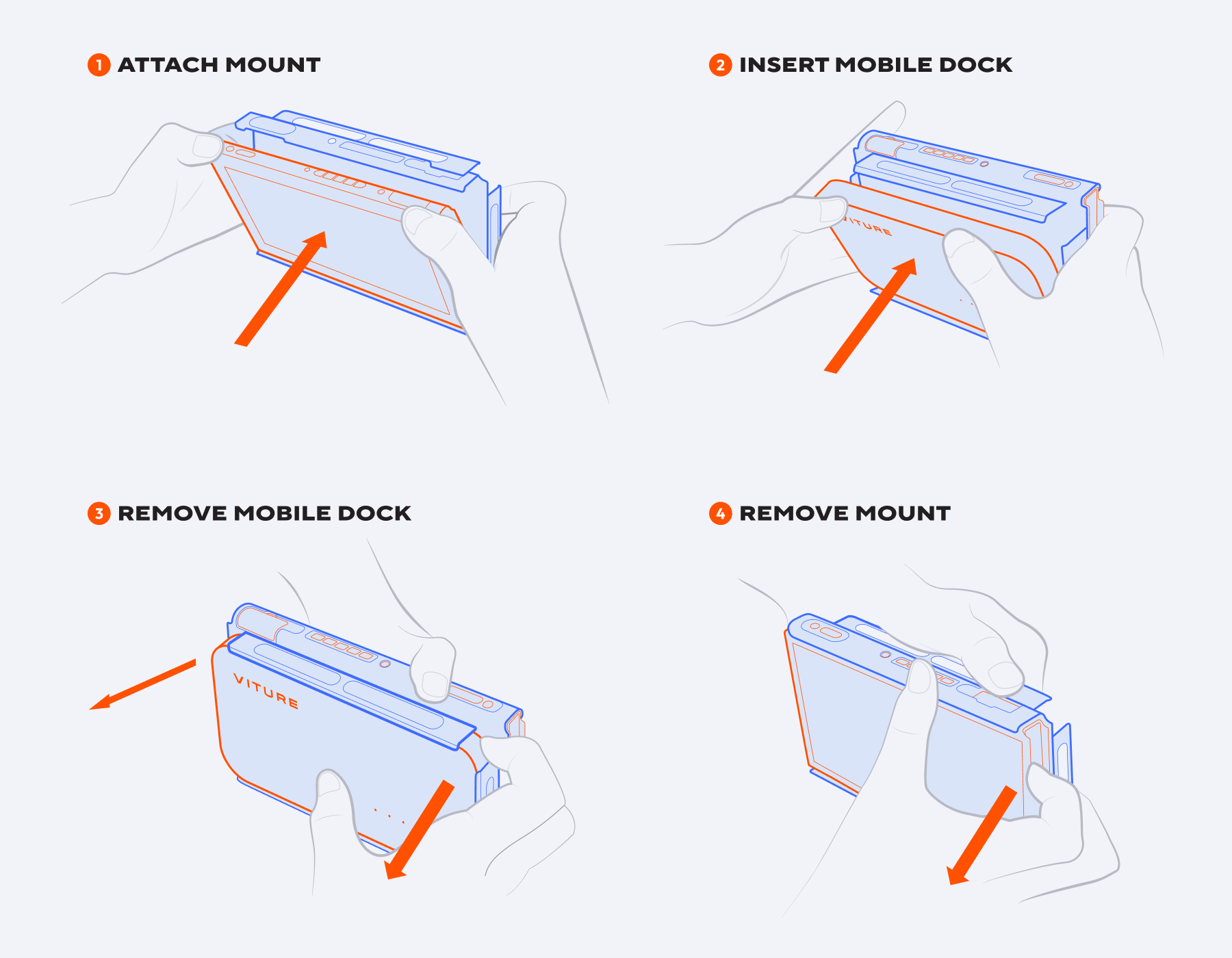
The Mobile Dock Mount for Switch 2 consists of two parts:
To Attach the Mount:
To Remove the Mount:
Please note: When using the Mobile Dock, handheld mode is disabled. Detach the Joy-Cons or use a wireless controller to play your Switch 2 while docked.
Mobile Dock Mount for Switch
Compatibility: VITURE Pro Mobile Dock, VITURE One Mobile Dock
The Mobile Dock Mount for Switch allows you to conveniently mount your Mobile Dock directly to your Nintendo Switch for ease of carry and storage — just slip it on, connect, and start playing.
Get Mobile Dock Mount for Switch.
| Dimensions | 173.0 × 104.0 × 37.1 mm |
|---|---|
| Weight | 62g |
| Material | PC |
To attach or remove the Dock Mount:
Mobile Dock Mount for Steam Deck
Compatibility: VITURE Pro Mobile Dock, VITURE One Mobile Dock
The Mobile Dock Mount for Steam Deck allows you to conveniently mount your Mobile Dock directly to your Steam Deck for ease of carry and storage — just slip it on, connect, and start playing.
Get Mobile Dock Mount for Steam Deck.
| Dimensions | 176.0 × 120.0 × 41.0 mm |
|---|---|
| Weight | 66.1g |
| Material | PC |
To attach or remove the Dock Mount: