配件
Switch 2 魔宝坞背夹
适配: VITURE Pro 魔宝坞,VITURE One 魔宝坞
Switch 2的魔宝坞背夹允许您将魔宝坞和 Switch 2 安全地安装在一起。它的设计便于携带和方便使用,使两个设备整齐地组装成一个单元。
请注意,此背夹仅设计用于Switch 2。它与第一代Nintendo Switch不适配。
| 尺寸 | 171.7 × 95.0 × 24.7 mm (魔宝坞包装盒) 68.1 × 121.2 × 19.7 mm (Switch 2 背夹) |
|---|---|
| Weight | 69.98g |
| Material | PA66 (魔宝坞包装盒) PA66, TPE (Switch 2 背夹) |
指南
Switch 2 魔宝坞背夹包含两部分:
-一个较大的外壳,四个角都紧贴在移动底座周围 -更薄的 Switch 2支架
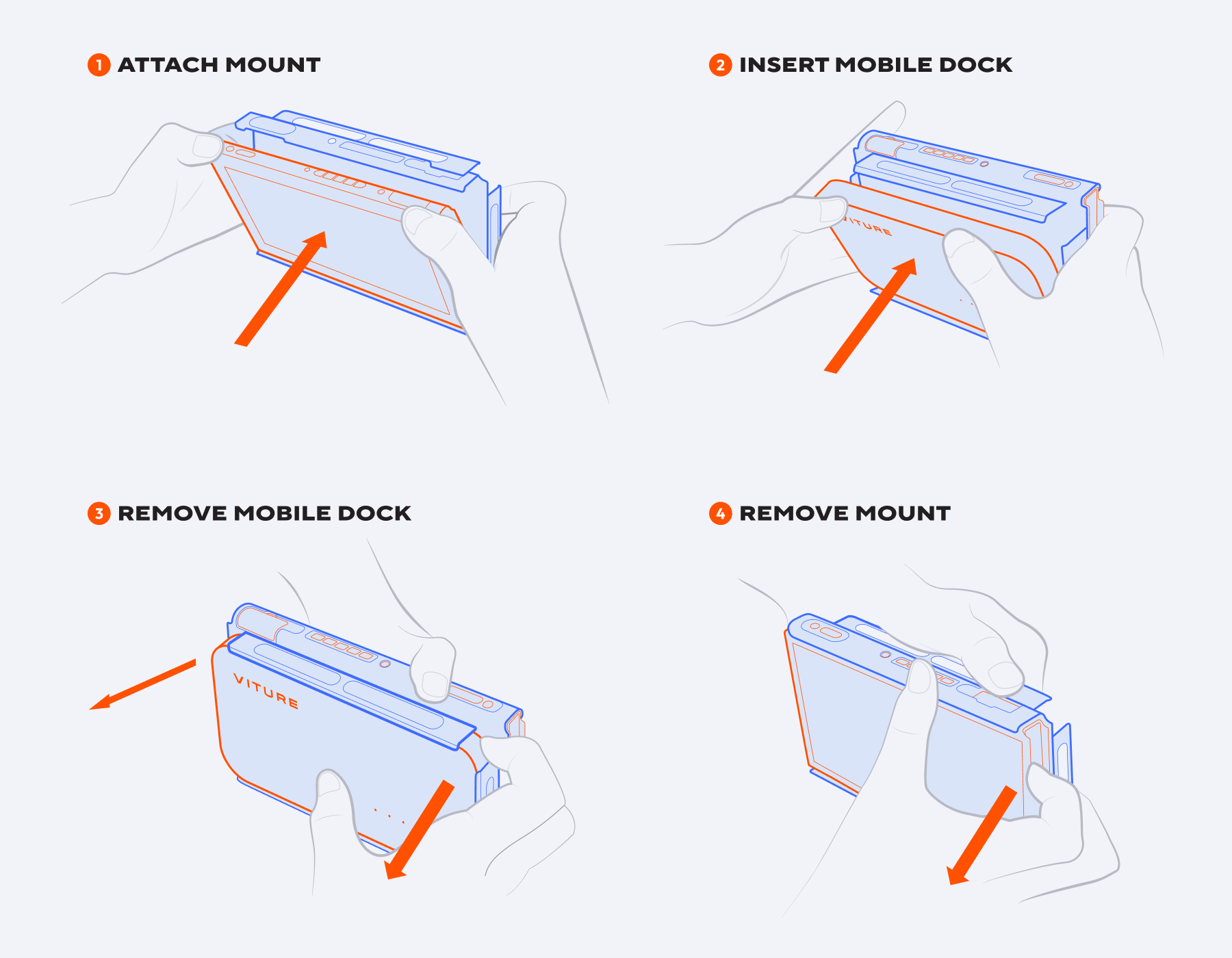
连接背夹:
Hold the Mobile Dock and its corresponding case. The case has port markings that align with the ports on the Mobile Dock. Match these markings to ensure the correct orientation. Slide one of the longer sides of the Mobile Dock into the case, then press the other side in until it fits securely.
Locate the bottom edge of the Switch 2. You’ll find two notches that align with the small protrusions on the mount. There is also a cutout that exposes the USB-C port. Align the bottom edge first, then press the top part in to snap it into place.
Slide the Mobile Dock down into the mounted Switch 2 from the top. Make sure you’re inserting it in the correct orientation for a snug, secure fit. Use the beveled edges (not the square corners) as a guide to help align and insert properly.
1.握住魔宝坞和其对应的底座。该案例具有与移动码头上的端口一致的端口标记。匹配这些标记以确保正确的方向。将移动码头的一个较长的侧面滑入箱子中,然后将另一侧压入箱子中,直到牢固安装。
2.定位开关2的底部边缘。您会发现两个缺口与山上的小突起相吻合。还有一个突出显示USB-C端口的切口。首先对齐底部边缘,然后按顶部部分将其固定到位。
3.将移动坞站从顶部滑入安装好的交换机2。确保您将其插入正确的方向,以获得舒适,安全的贴合度。使用斜边(而不是方角)作为指南,以帮助正确对齐和插入。
移除背夹:
1.首先,向上滑动魔宝坞,使其与 Switch 2 分离。 2.要从魔宝坞中卸下坞站背夹,请轻轻向外弯曲机箱的一侧,然后将魔宝坞提出。 3.要从 Switch 2 上拆下安装架,请抓住安装架的顶部边缘,然后轻轻将其从设备中拉出。
Please note: When using the Mobile Dock, handheld mode is disabled. Detach the Joy-Cons or use a wireless controller to play your Switch 2 while docked.
Switch 魔宝坞背夹
适配: VITURE Pro 魔宝坞,VITURE One 魔宝坞
魔宝坞 Switch 背夹可以方便地将 VITURE One 魔宝坞直接安装到 Nintendo Switch 上,以便于携带和存放 - 只需安装、连接并开始游玩。
| 尺寸 | 173.0 × 104.0 × 37.1 mm |
|---|---|
| 重量 | 62g |
| 材质 | PC |
要安装或移除背夹:
将背夹安装到 Switch 上。
插入魔宝坞。
移除魔宝坞。
从 Switch 上移除背夹。